
Futures copy trading adds trailing exit and custom copy multiplier features
Futures copy trading adds trailing exit and custom copy multiplier features
Bitget version 3.2.0 is now live, with updates available on both the app and web. This version upgrades risk controls for futures copy trading by adding trailing exit and a custom copy multiplier, helping you better manage risk and positions.
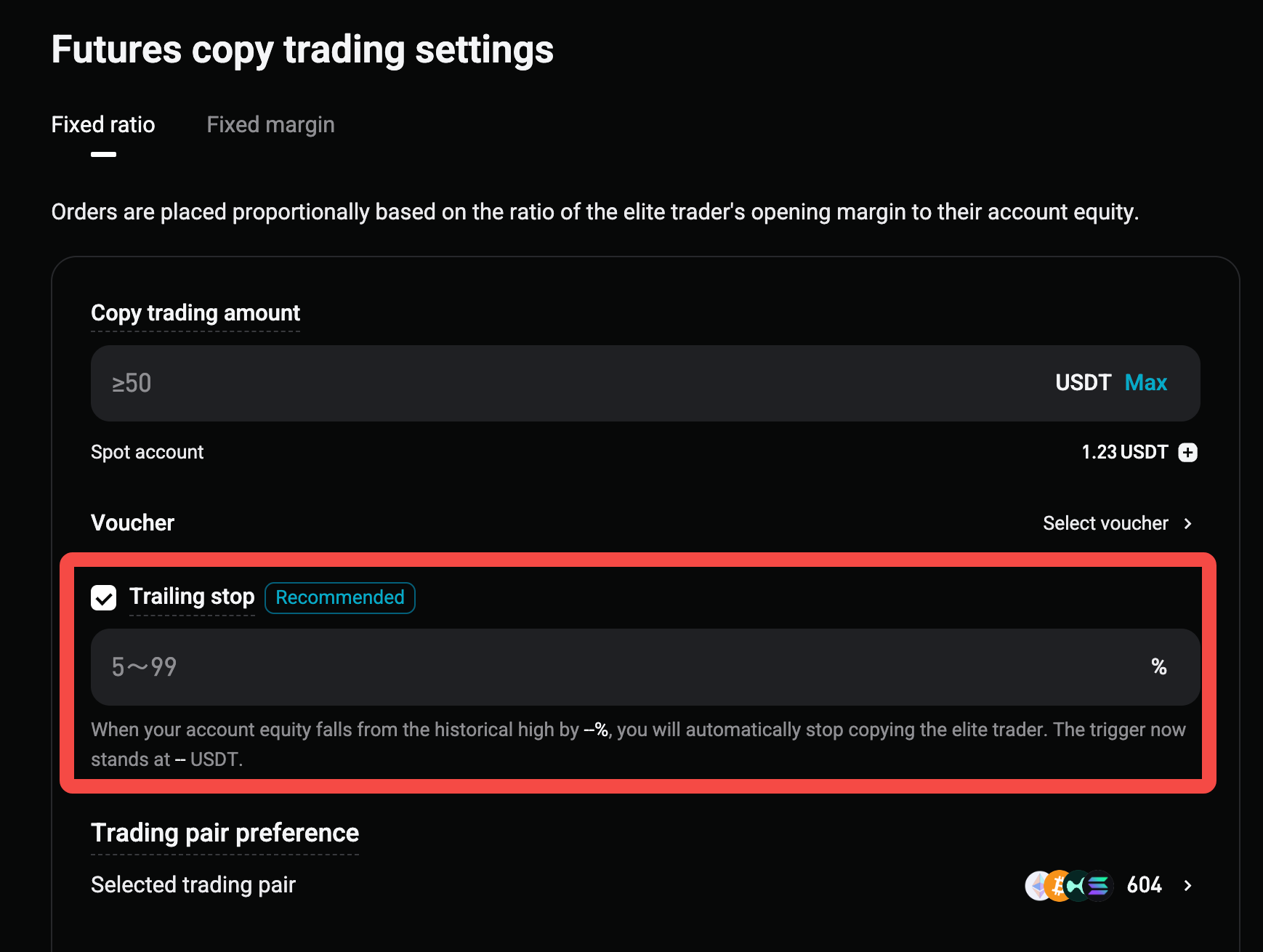
1. New trailing exit feature: Automatically lock in floating gains and control maximum drawdown
What it is:Once enabled, the system monitors your copy trading account equity, including unrealized PnL. When your equity falls from its all-time high by the percentage you set, the system automatically closes all positions at market price and stops copying, so you do not need to constantly monitor the market.
Highlights:
-
Lock in gains when profitable:Whenever your equity reaches a new high, the trigger threshold moves up accordingly.
-
Limit drawdown when losing:This feature still applies even if the account has never made a profit. For example, if you set it to 20%, a 20% loss from your initial equity will automatically trigger a stop-loss exit.
-
Fund transfers will not trigger it by mistake:Whenever funds are transferred in or out, the system resets the high-water mark and trigger equity based on the current equity. The update is completed within 10 s.
-
Receive prompt notification when triggered:You will receive an in-app message, and "Trailing exit triggered" will appear as the reason for stopping in your copy trading history.
How to set it up:
-
On the copy trading settings page, select "Trailing exit" below "Copy trading amount." This option is marked "Recommended."
-
Enter an integer drawdown percentage from 5% to 99%.
-
The page displays your current trigger equity in real time. You can also change the setting at any time on the copy trading details page.
2. New custom copy multiplier: More predictable margin for opening positions
What it is:In fixed ratio mode, you can set a fixed multiplier from 0.1 to 10, with one decimal place. Your copied trades will use a fixed multiple of the elite trader's margin for opening positions.
What problem it solves:Previously, the fixed ratio changed with the ratio of your funds to the elite trader's funds, making it difficult to estimate the actual position size after funds were transferred in or out. With a fixed multiplier, the market exposure of each copied trade becomes stable and controllable.
How to use it:
-
This is the first option under "Master settings" and is only displayed in fixed ratio mode. Leave it blank to continue using the original fixed ratio logic.
-
After you enter a value, your estimated margin for each position will be displayed. Open the "Estimated margin per order" pop-up to view the median margin used by the elite trader to open their last 200 positions, along with reference data for their top 3 futures.
-
Changes to the multiplier only apply to newly opened positions. Existing positions are not affected.
-
A "Maximum estimated margin per order" pop-up has also been added under "Position risk - Maximum margin ratio per order," helping you clearly see the actual limit after applying your settings.
3. Optimizations to elite trader profiles and the leaderboard
-
The updatedfutures elite trader profile adds "Average profit"and"Average loss"metrics:These metrics appear below "Win rate," are calculated after deducting transaction fees and funding fees, and update when you switch between the 7D, 30D, 90D, and 180D periods. They help you better identify each elite trader's strategy style.
-
The "All elite traders" leaderboard adds a "Most copied" quick-sort option:Elite traders are ranked by their current number of copiers in descending order. If multiple elite traders have the same number of copiers, they are ranked by total profit for the selected period.
-
The "Leaderboard" cards on the web now include the "Win rate" metric.
Important notes
-
Trailing exit updates approximately every 10 s. Due to this polling interval and price slippage during a market close, the actual equity when positions are closed may differ from the trigger threshold.
-
After you change the trailing exit percentage, if the new trigger equity is higher than your current account equity, saving the change will immediately trigger an exit and stop copy trading. Please confirm before saving.
-
Futures trading involves risk. The risk control tools above do not guarantee returns. Configure them appropriately based on your risk tolerance.
For more information about futures copy trading settings, see the Help Center article.
*This announcement is time-sensitive. Please note the date of publication. The platform assumes no responsibility for any direct or indirect losses arising from changing circumstances or outdated content.